- First public release. Seven selectable v2 model packages with hardware-fit classification and a qualification harness.
- Capability and live-memory model router with sequential hot-swap.
- MCP fixture-server end-to-end and JSON-RPC error surfacing.
- Real Playwright web-fixture end-to-end test.
- Bounded web/research fetch tool, four-tier sandbox, evidence-driven completion.
- Public one-line installer with SHA-256-verified release sdist; GitHub Pages site.
local-first · multi-model · evidence-driven
Bring your own models.
Keep your code local.
PROMETHEUS is a local-first, adaptive multi-model coding agent — a private coding agent that runs on your hardware. A tool-capable controller works with optional coding, reasoning, reviewing, and vision specialists. Ollama is the default backend; cloud and other OpenAI-compatible backends are pluggable and always opt-in. Think of it as a local Claude Code or local OpenCode alternative you fully own.
- Private by default. Runs on your machine. Network use is explicit and visible. No telemetry.
- Honest about hardware. Detects your CPU, RAM, GPU, and VRAM, and recommends a model package that actually fits.
- Evidence-driven completion. A deterministic evaluator — not a model opinion — decides when a task is done.
Get the install command Compare model packages View releases
Installation
Install PROMETHEUS
Pick your operating system, copy one command, and paste it into a terminal. You do not need to clone the repository first. This is a multi-model coding CLI you can run as an offline AI programming assistant once models are downloaded.
Supported. The installer detects your distribution, installs an isolated runtime, and places prometheus on your PATH.
curl -fsSL https://raw.githubusercontent.com/FeverDream-dev/Prometheus/main/install.sh | sh
Prefer to download and inspect the script first?
Download the installer, read it, then run it locally. The SHA-256 of the release artifact is verified by the installer before anything executes.
curl -fsSL https://raw.githubusercontent.com/FeverDream-dev/Prometheus/main/install.sh -o install.sh
less install.sh
sh install.sh
Supported on Apple Silicon and Intel. The installer uses an isolated Python runtime in your home directory and never modifies system Python.
curl -fsSL https://raw.githubusercontent.com/FeverDream-dev/Prometheus/main/install.sh | sh
Prefer to download and inspect the script first?
Download the installer, read it, then run it locally.
curl -fsSL https://raw.githubusercontent.com/FeverDream-dev/Prometheus/main/install.sh -o install.sh
less install.sh
sh install.sh
Windows is supported through WSL 2 only. Native Windows is not supported yet. The PowerShell bootstrap installs PROMETHEUS inside a WSL distribution.
irm https://raw.githubusercontent.com/FeverDream-dev/Prometheus/main/install.ps1 | iex
Prefer to download and inspect the script first?
Download the PowerShell bootstrap in PowerShell, review it, then run it.
iwr https://raw.githubusercontent.com/FeverDream-dev/Prometheus/main/install.ps1 -OutFile install.ps1
notepad install.ps1
& ./install.ps1
No telemetry. This page loads no analytics, no trackers, and no external fonts. The installer never phones home. Default telemetry is OFF.
Model packages
Compare the seven packages
PROMETHEUS ships selectable, pre-built model packages that fit your detected
hardware. Each pairs a tool-capable controller with optional specialists.
Data below is loaded from packages.json, which is generated from
the config/bundles-v2/ manifests and drift-checked by the test
suite. Download sizes are approximate; every tag except
granite4.1:3b must be qualified at install time.
| Package | Controller |
|---|---|
| Spark CPU / 8 GB | granite4.1:3b |
| Ember 8 GB GPU | qwen3.5:4b |
| Forge 12 GB balanced | qwen3.5:9b |
| Oracle Gemma 4 multimodal | gemma4:12b |
| Titan 24 GB quality | qwen3.5:27b |
| Hephaestus 24 GB coding team | qwen3.5:9b + devstral:24b |
| VibeThinker review add-on | none — review only |
Models load sequentially (one at a time) unless your hardware safely fits more. VibeThinker is an optional reasoning/review specialist and is never the tool controller. Licenses marked “verify-at-install” must be confirmed from the upstream source at install time. Qwen3-Coder-Next is deliberately excluded from 24 GB local defaults (its Q4 package is roughly 52 GB).
Pricing model
Quota-free local, or metered cloud
“Unlimited” is not a marketing word here. Local sessions through Ollama have no artificial message, token, daily, or project quotas. They remain bounded by your RAM, VRAM, context window, disk, and model speed. Cloud APIs keep their own provider quotas, rate limits, and costs.
Local (Ollama) — quota-free
- No product quotas on messages, tokens, days, or projects.
- Constrained by your RAM/VRAM, context window, disk, and model speed — not by us.
- Unlimited local sessions enabled by default; caps are opt-in.
- Runs fully offline once models are downloaded.
Cloud — metered by the provider
- Always opt-in and clearly labeled “metered”.
- Provider quotas, rate limits, costs, and terms apply.
- Optional cost/token budgets can be set for cloud only.
- No silent cloud fallback when a local, privacy-only mode is active.
BundleForge
Create custom bundles for your use case
Ask PROMETHEUS in plain language what you want to build. BundleForge picks the right models, validates licenses, checks hardware fit, and creates an installable bundle — no YAML editing required.
01Natural-language matching
prometheus bundleforge recommend "I want to build a 2D game with sprites" — deterministic keyword engine maps to the right template, checks hardware, and falls back to lighter alternatives when needed.
0210 starter templates
Web dev, game dev, RAG docs, WhatsApp MCP, QA browser vision, AssetForge icons, CPU-only emergency, cloud hybrid — each with roles, permissions, and honest license notes.
0323-model catalog
Coding, general, embeddings, and image-generation models with tracked licenses. Commercial-safe enforcement prevents non-commercial models (SDXL Turbo) from entering commercial bundles.
04Local RAG + MCP starters
prometheus rag init | ingest | query for local document memory. MCP templates (prometheus mcp templates) with honest caveats — never claiming WhatsApp works without a real server.
Features
What works today (verified, not promised)
Only behavior backed by a test or a real run is listed here. This is an honest snapshot of the current MVP, not a roadmap dressed up as features.
01Hardware-aware package selection
Cross-platform detection of CPU, RAM, GPU, and VRAM, with an honest Ollama binary-vs-service distinction in doctor. Packages are recommended only when they actually fit.
02Consent-gated first-run wizard
setup detects Ollama, offers to install it only after explicit approval, pulls approved models with live progress, discovers models you already have, and runs a real inference smoke test.
03Durable sessions
A SQLite store with a monotonic event log, tasks, evidence, and checkpoints. Sessions resume after restart via prometheus resume.
04Evidence-driven completion
A deterministic weighted evaluator overrides the model’s self-reported completion. A task cannot be marked complete unless criteria are met with tool-result evidence.
05Git checkpoints and safe rollback
Every mutation is checkpointed and recoverable. Atomic file writes use temp-plus-fsync-plus-rename. Destructive actions always require approval.
06Secret and path safety
Secrets are redacted from evidence, model requests, and output. Workspace path-traversal and symlink-escape are guarded.
07Real Ollama inference
Proven against real models (for example granite4.1:3b and llama3.2:latest) in an opt-in end-to-end repair test, not only mocked providers.
08Textual TUI
A streaming terminal UI with approval prompts, a status bar, and a startup splash that is non-TTY and reduced-motion safe.
Application shell
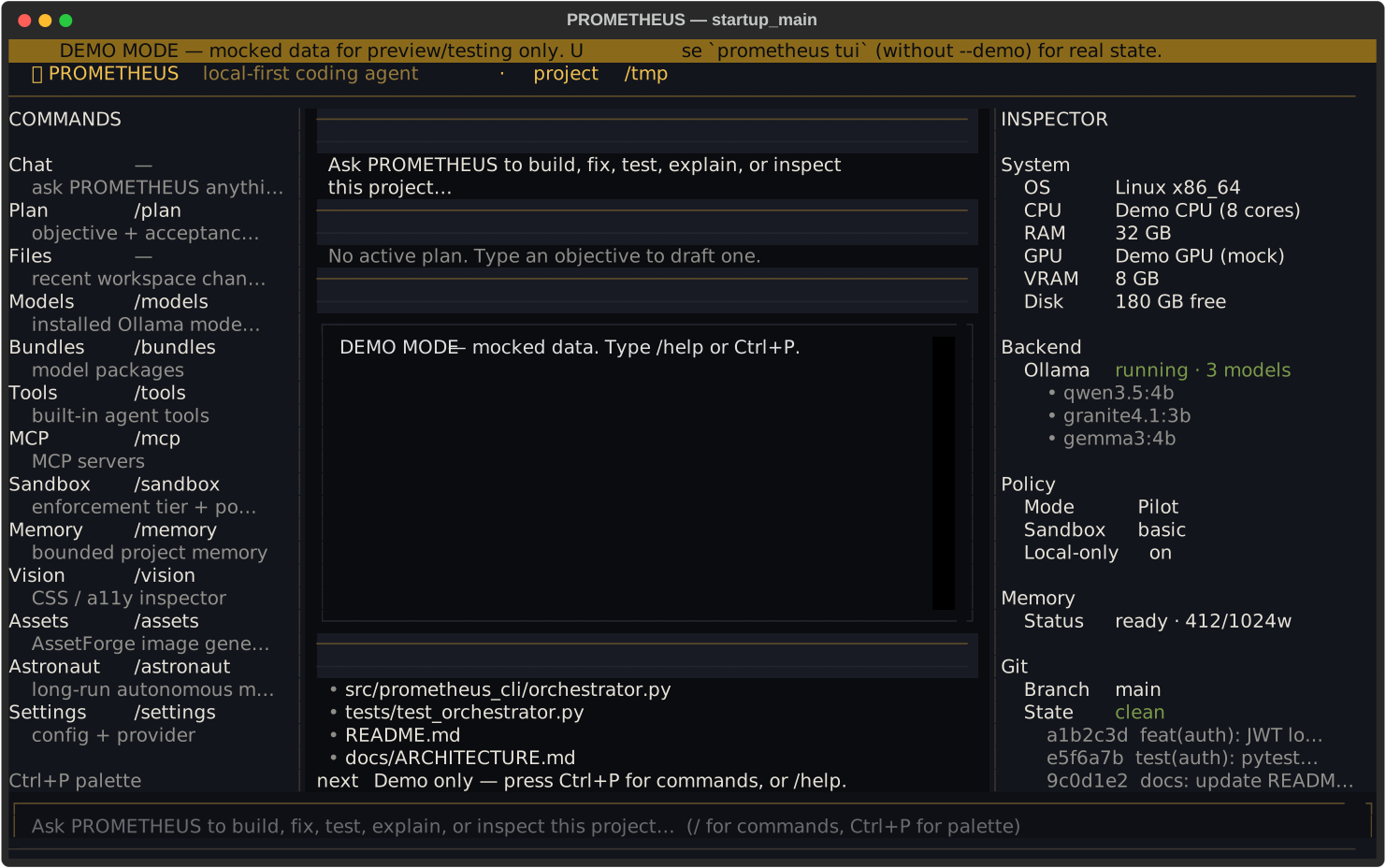
PROMETHEUS TUI — local-first coding agent interface
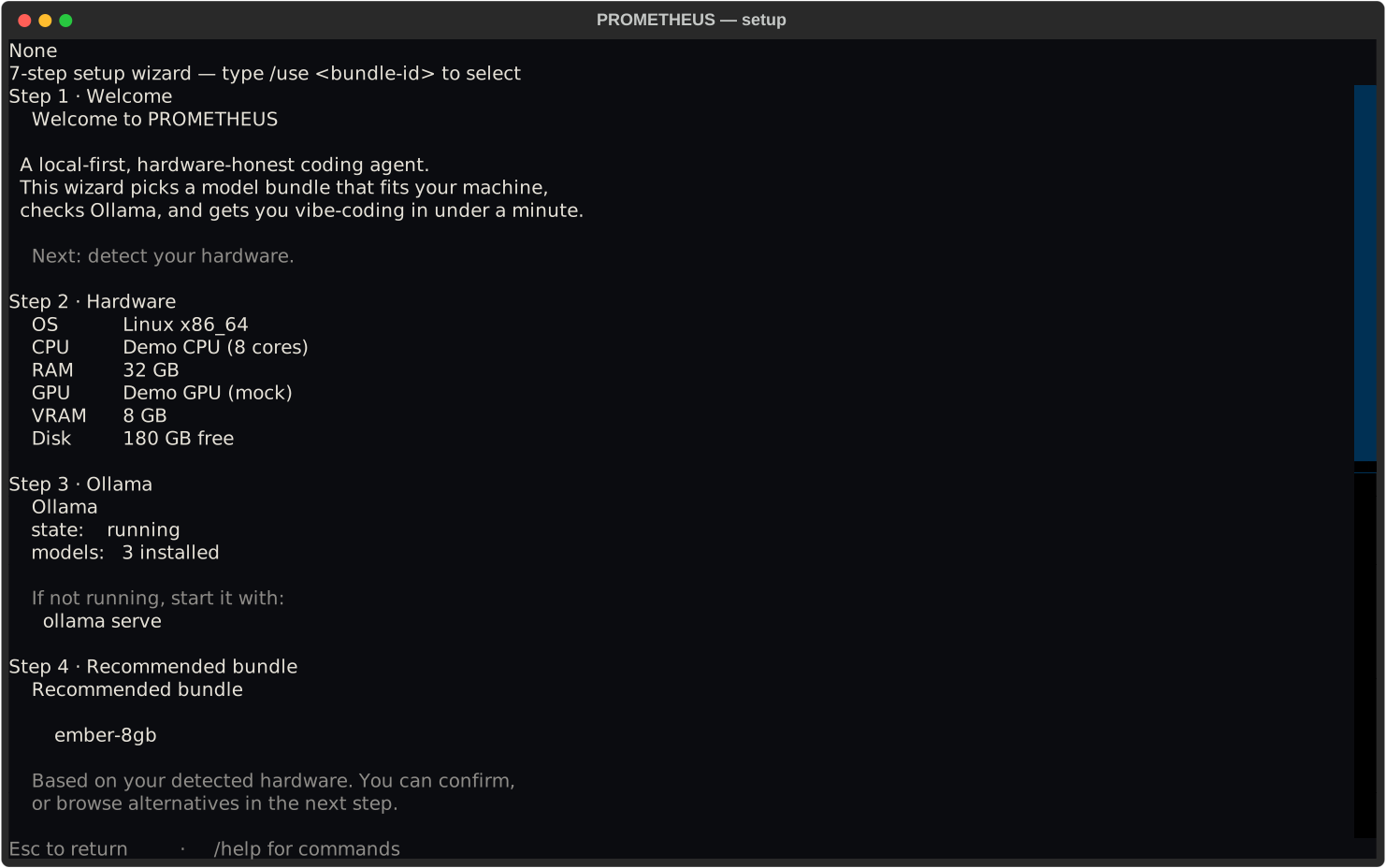
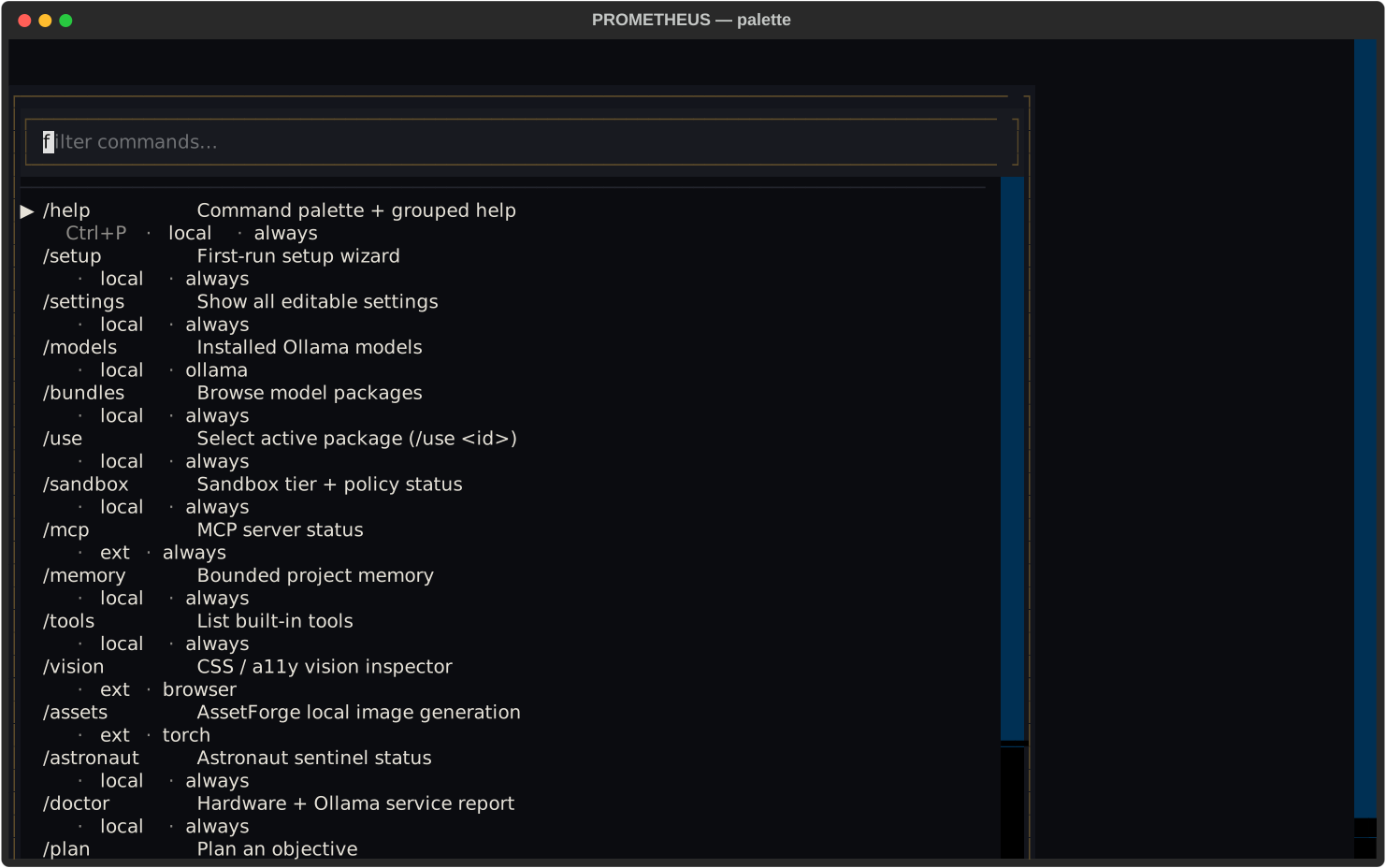
A polished terminal application shell: persistent brand header, left command rail, right inspector panel, dense status bar, rich slash-command screens, a 7-step setup wizard, and a command palette. No raw markup, no debug-box feel — built with Textual.
Launch
prometheus tui                                        # real mode
prometheus tui --demo                                 # mocked data, no Ollama
prometheus tui --screenshot out.svg --screen setup    # headless SVG export
bash scripts/tui_visual_smoke.sh                      # export all screens
Demo mode renders fully-mocked realistic state (bundle ember-8gb,
mode Pilot, 3 Ollama models, clean git on main)
— for UI preview and tests only. Real mode reads actual project state.
23 slash screens
help, setup, settings, models, bundles, sandbox, memory, vision, assets, astronaut, doctor, mcp, tools, modes, sessions, telemetry, logo, diagnose, plan, permissions, providers
Keyboard
Ctrl+P palette · Ctrl+B sidebar · Ctrl+I inspector · Ctrl+L clear · Ctrl+Q quit · Esc dismiss
Responsive
80×24 · 100×30 · 120×36 · 160×48 — panels collapse gracefully at narrow widths
Extensibility
MCP and the built-in tools
PROMETHEUS is an Ollama coding assistant with a typed, schema-validated tool broker and a standards-based MCP client. Tools declare their risk, required permissions, side effects, and redaction rules.
Built-in tools
- Files: list/tree, bounded read, ripgrep search, symbol search, atomic write, apply-patch, diff, with path and symlink-escape protection.
- Process: argument-array execution, supervised long-running processes, streaming with limits, cancellation, timeouts, and process-tree cleanup.
- Git: status/diff/log, pre-change and verified checkpoints, branch creation, and rollback that preserves your work.
- Browser & vision: Playwright automation for deterministic testing; screenshots feed the active vision role when needed.
- Web/research: bounded fetch and reader with citations, domain permissions, and web content treated as untrusted.
MCP client
- Add, remove, enable, or disable servers globally and per project.
- Stdio transport today; Streamable HTTP is on the roadmap.
- Namespaced tools to prevent collisions; per-server trust and permission scope.
- A prompt-injection boundary: MCP output is treated as untrusted data, never as system policy.
- Output size and time limits with redaction.
Privacy and control
Security, privacy, and autonomy modes
The deterministic engine — never an untrusted model — owns permissions and tools. Internet use is explicit and visible. There is no telemetry by default; local audit logs are yours to read and delete.
Copilot
Suggestive
Reads automatically and asks before any write or command. Best when you want to stay in full control of every change.
Pilot
Balanced
Applies edits and safe tests automatically, and asks before network use, installs, or risky commands.
Astronaut
Autonomous within scope
Runs within a declared capability envelope. Destructive actions always require approval, even here.
Five repeated failures sharing one cause trigger a different model or persona and a newly stated hypothesis — not five cosmetic retries. “Unlimited” local operation never disables emergency cancellation, memory and disk protection, permission policy, or destructive-action approval.
Compatibility
Support matrix
An honest view of where PROMETHEUS runs today.
| Operating system | Status | Notes |
|---|---|---|
| Linux (x86_64) | Supported | Ubuntu/Debian, Fedora, and Arch exercised in CI. Other distributions are best-effort. |
| macOS (Apple Silicon) | Supported | Metal acceleration via Ollama. |
| macOS (Intel) | Supported | CPU mode. |
| Windows (WSL 2) | Supported | Requires WSL 2. GPU passthrough depends on your driver. |
| Windows (native) | Not supported | Use WSL 2. Native Windows is planned, not shipped. |
Requirements
System requirements
Minimum
- 8 GB RAM, 10 GB free disk (more for models)
- Linux, macOS, or Windows via WSL 2
curlorwget, and Git- Python 3.11+ — the installer can bootstrap an isolated runtime if needed
- Ollama is optional and auto-detected on first run
Recommended
- 16–32 GB RAM
- NVIDIA, AMD, or Apple Silicon GPU with 12–24 GB VRAM for larger packages
- SSD with 40+ GB free for model storage
- Ollama installed and running for the default local backend
Transparency
What the installer does
Nothing runs as root without your explicit approval.
- Detects your OS, CPU architecture, and an available runtime or package manager.
- Downloads the release artifact from the
FeverDream-dev/PrometheusGitHub Release and verifies its SHA-256 checksum before executing anything. - Installs into an isolated, user-owned location —
~/.local/share/prometheus/versions/<version>— and never modifies your system Python. - Creates a
prometheuslauncher in~/.local/binand either adds it to your PATH or prints the exact shell command to do so. - Runs
prometheus doctorto print a full hardware report, then starts first-run setup. - Writes a diagnostic log (no secrets), is idempotent, and is safe to run twice.
- Supports
--dry-run,--version,--prefix,--no-ollama, and noninteractive/CI modes. - Provides
prometheus uninstallto remove PROMETHEUS while preserving your downloaded models and projects.
First run
What happens on first run
prometheus setup is an interactive wizard — it does not just print hints.
-
Ollama detection
PROMETHEUS checks both that the Ollama binary exists and that the service actually responds (via
/api/tags). It never confuses “installed” with “running”. -
Approval before install
If Ollama is missing, PROMETHEUS offers to install it — but only after you explicitly approve the exact command. It never silently pipes a vendor script as root.
-
No duplicate downloads
Models you already have are discovered first, so nothing is re-downloaded.
-
Packages that fit — with sizes shown first
A package is recommended for your detected RAM and VRAM, with approximate download sizes up front before you approve anything.
-
Download only what you approve
Every model download asks for confirmation and shows its size. Nothing is fetched without your say-so.
-
Smoke test, then save
After configuration, a short inference probe validates a real response, and your working configuration is saved atomically.
CLI
Quick commands
After install, prometheus is on your PATH.
| Command | What it does |
|---|---|
prometheus | Launch the interactive TUI. |
prometheus setup | Detect hardware, pick a package, and configure Ollama. |
prometheus doctor | Print the full hardware report and package fit. |
prometheus run "<task>" | Run an evidence-driven coding session. |
prometheus sessions | List recent sessions and their completion. |
prometheus resume <id> | Resume a session from the durable event log. |
prometheus modes | Explain the Copilot, Pilot, and Astronaut autonomy levels. |
prometheus bundles | List model packages and hardware fit. |
prometheus qualify | Qualify a package against its capability tests. |
prometheus update | Update to the latest release. |
prometheus uninstall | Remove PROMETHEUS, keeping your models and projects. |
Documentation
Quick start and troubleshooting
A condensed quick start, plus fixes for the issues new users hit most. Full
specifications live in the docs/ directory of the repository.
Quick start
prometheus setup      # detect hardware, pick a package
prometheus            # launch the TUI
prometheus run "Fix the failing tests" --workspace .
prometheus sessions   # list sessions + completion
Prefer to read the full guides? See docs/PRODUCT_SPEC.md, docs/ARCHITECTURE.md, docs/SECURITY.md, and docs/ACCEPTANCE_TESTS.md in the repository.
Real-Ollama end-to-end (opt-in)
PROMETHEUS_E2E_OLLAMA=1 \
PROMETHEUS_E2E_MODEL=granite4.1:3b \
pytest tests/test_e2e_ollama.py -q -s
This drives the full provider-to-tools-to-evidence-to-completion loop against a real local model. It is opt-in so CI never downloads weights.
Troubleshooting
Troubleshooting
prometheus: command not found (PATH)
The launcher lives in ~/.local/bin. Add it to your PATH:
export PATH="$HOME/.local/bin:$PATH"Put that line in ~/.bashrc or ~/.zshrc to make it permanent, then open a new terminal.
Ollama service is not running
PROMETHEUS needs the Ollama service, not just the binary. Start it:
ollama serve                                  # foreground, any OS
systemctl --user start ollama                 # Linux, if installed as a unit
brew services start ollama                    # macOS
Verify with prometheus doctor, which reports service health.
My GPU is not detected
Install current drivers: NVIDIA CUDA, AMD ROCm or Vulkan, or the Apple Silicon Metal build of Ollama. Then run prometheus doctor and confirm VRAM appears. On Linux without a GPU, PROMETHEUS falls back to the CPU-only Spark package.
Setting up WSL 2 on Windows
Install WSL 2 from PowerShell, then run the Windows bootstrap, which installs PROMETHEUS inside the WSL distribution:
wsl --install -d Ubuntu
# restart, then in PowerShell:
irm https://raw.githubusercontent.com/FeverDream-dev/Prometheus/main/install.ps1 | iex
Permission errors
The installer is user-scoped and should never need sudo. If it asks for elevated privileges, stop and inspect the script. Run the download-and-inspect alternative shown in the install section instead.
Using PROMETHEUS offline
Once models are downloaded, PROMETHEUS runs fully offline. Pass --no-ollama to the installer or decline network prompts during setup. Cloud providers are always opt-in and never required.
Releases
Changelog and releases
The release workflow builds an sdist and wheel, SHA-256 sidecars, a CycloneDX SBOM, a release manifest with build provenance, and a clean-venv bootstrap smoke job. v0.1.0 is published — verified, checksum-signed, and installable from the GitHub Release.
v0.1.02026-06-21
mainprior
- Public one-line installer, first-run wizard, SQLite sessions, evidence-driven completion.
- Git checkpoint and rollback, atomic writes, secret redaction, path and symlink guards.
- Sandbox broker, Playwright browser tools, MCP client (stdio), rotating ASCII splash.
- GitHub Pages site and deploy workflow.
License
License and commercial use
PROMETHEUS is dual-licensed. The models themselves retain their own upstream licenses (for example Apache-2.0 for Granite, Gemma-Terms for Gemma, MIT for VibeThinker). Licenses marked “verify-at-install” must be confirmed from the upstream source before use.
The agent and its tooling are open to community use; commercial terms are defined in the repository license. Commercial use of the bundled models is governed by each model’s own license — verify before deploying in production.
In the terminal
A look at the TUI
$ prometheus setup
  detecting OS · CPU · RAM · GPU · VRAM · disk
  ollama service: ready (models found via /api/tags)
  recommended package: shown only if it fits your hardware
  approve download? [y/N] _
  PLACEHOLDER — a real terminal recording will replace this rendering.